

DH-510 Tiekėjo keitimas
Tiekėjo keitimo (toliau - NTK) funkcionalumas yra skirtas informuoti skirstymo operatorių apie su klientu sudarytą naują tiekimo sutartį dėl konkrečių jam prikausančių objektų.
Šis funkcionalumas yra naudojamas, kai:
- Klientas jau pasirašė tiekimo sutartį su tiekėju;
- Nėra keičiamas objekto savininkas (proceso "Savininko ir tiekėjo keitimas" aprašą žiūrėti čia).
| Aktualu nuo | Skyrius | Pokyčio aprašas |
|---|---|---|
| 2025-08-01 | - | Nauja dokumentacijos strukūra |
PAGRINDINĖS TAISYKLĖS:
| Eil. Nr. | Taisyklė | Papildoma informacija |
1. | Objekto, dėl kurio norima pateikti naujos sutarties sudarymo užklausą, paieška yra galima pagal:
| Pateikus turimus atributus paieškai, būtina patvirtinti, kad yra gautas nurodyto asmens/ įmonės sutikimas matyti jam prikausančių objektų sąrašo duomenis (objectDataConsentSign). Nepatvirtinus, objektų duomenys nėra pateikiami. |
2. | Vienoje užklausoje tiekėjo keitimas gali būti atliekamas tik vienai sutarčiai (tam pačiam vartotojo kodui) priklausantiems objektams. | |
3. | Jei Tiekėjas1 jau yra pateikęs NTK1 užklausą dėl objekto X, Tiekėjas2 gali pateikti NTK2 užklausą "ant viršaus" dėl to paties objekto X nuo tos pačios ar ankstesnės datos. |
|
4. | Jei Tiekėjas1 jau yra pateikęs STK1 užklausą dėl objekto X, kuri dar nėra Įvykdyta, Tiekėjas2 negali pateikti NTK1 užklausos "ant viršaus" dėl to paties objekto X nuo tos pačios ar ankstesnės datos. | Norint pateikti užklausą, reikia pirmiausia atšaukti STK užklausą, naudojantis funkcionalumu "Užklausų atšaukimas" (Funkcionalumo "Užklausų atšaukimas" aprašas.) |
5. | NTK atveju laukai „Sutarties savininko / nuomininko asmens tipas" ir „Sutarties tipas" yra neredaguojami. | - |
6. | Sutarties įsigaliojimo data gali būti tik sekančio mėnesio 1 diena. | Sutarties įsigaliojimo datos pasirinkimas į praeitį yra negalimas. |
7. | Jei sutarties įsigaliojimo data yra sekančio mėnesio 1 diena, tai NTK užklausa turi būti pateikiama iki priešpaskutinės einamojo mėnesio dienos. | Taip yra todėl, kad liktų bent viena diena iki sutarties įsigaliojimo datos ir esant reikalui būtų galima pateiktą užklausą atšaukti. Pavyzdys:
|
8. | Privaloma nurodyti sutarties modelį, kuris:
| - |
9. | Privaloma nurodyti tarp tiekėjo ir kliento sudarytos sutarties numerį. | - |
10. | Nors ir keisti objekto savininko NTK užklausos metu galimybės nėra, tačiau laukai, skirti vardui ir pavardei, yra redaguojami, siekiant į operatoriaus sistemas pateikti pilnai supildytą užklausos formą (tais atvejais, jeigu duomenys sistemose būtų teisingi, tačiau neatitiktų jų pildymo taisyklių, pvz. vardas ir pavardė būtų nurodyti viename laukelyje). | Vis dėlto nurodžius kitą objekto savininką nei yra operatoriaus sistemoje, jis išsaugomas ir užkeičiamas nebus. |
11. | Korespondencijos adresas yra neprivalomas. | - |
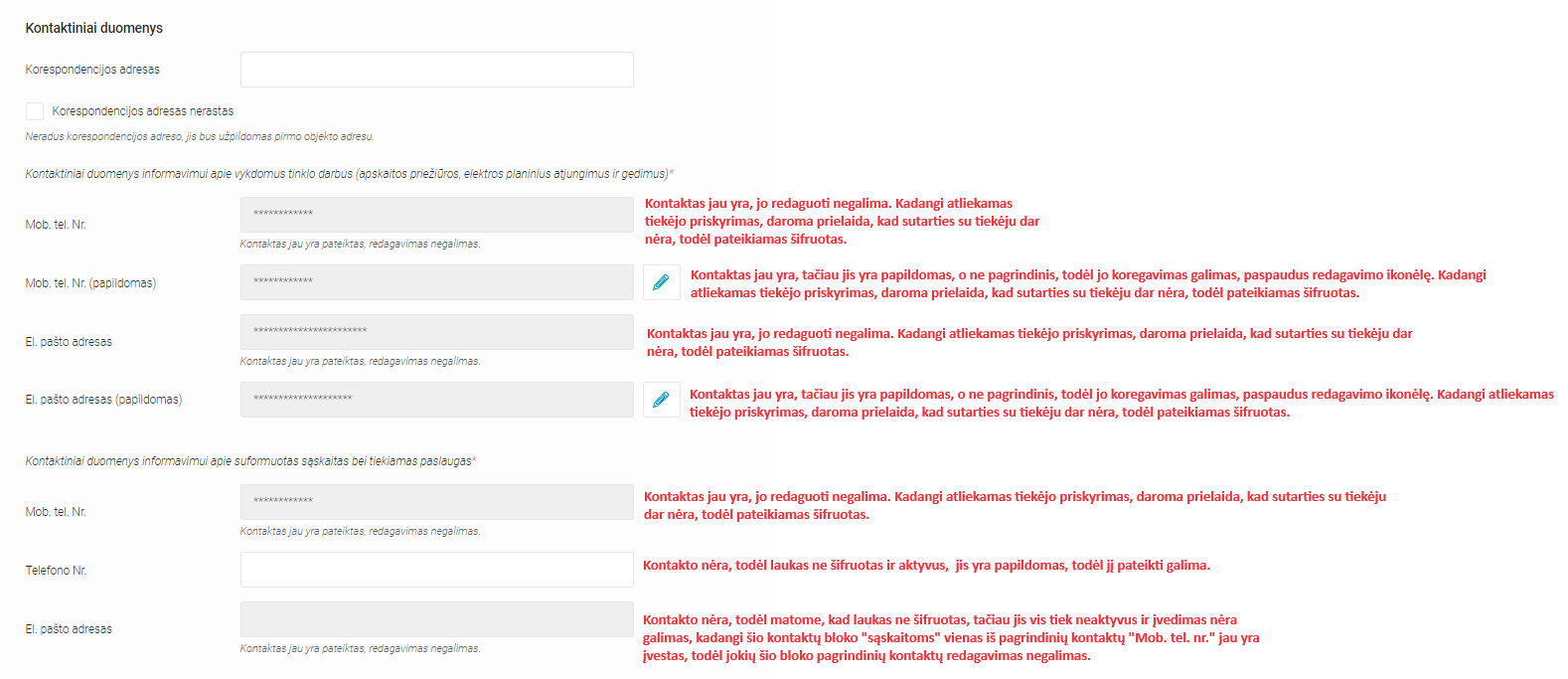
12. | Privaloma nurodyti kontaktinę informaciją |
|
13. | Tarifo plano/ laiko zonos keitimas gali būti atliekamas tik tiems objektams, kurių "Galima tarifo plano keitimo data" užklausos teikimo metu yra lygi arba mažesnė už einamają datą. |
|
14. | Nutolusių gaminančių vartotojų (NGV) objektams keisti apskaitos schemą ir/arba atsiskaitymo būdo negalima. | - |
15. | Gaminančio vartotojo (GV) objektui šiuo metu apskaitos schemos keitimas iš "Apskaita kilovatvalandėmis" į "Grynasis atsiskaitymas" negalimas. | Jei esama apskaitos schema "Grynasis atsiskaitymas" ir apskaitos schema nekeičiama - pritaikoma esama apskaitos schema. |
16. | GV atsiskaitymo būdo keitimas gali būti atliekamas tik toms naudojamoms elektrinėms, kurių "Galima atsiskaitymo būdo keitimo data" užklausos teikimo metu yra lygi arba mažesnė už einamają datą. |
|
17. | Jeigu apskaitos schema yra "Grynasis atsiskaitymas", apskaitos schemos keitimas į "Apskaita kilovatvalandėmis" galimas tik tuo atveju, jei jau yra suėjusi apskaitos schemos keitimo data. | - |
18. | Pasirinktas tarifo planas įsigalioti ankščiausiai galės tik nuo užklausoje nurodytos sutarties įsigaliojimo datos. |
|
19. | Prieš iššiunčiant užklausą vykdymui į ESO IT sistemas, užklausos atšaukimas per DataHub galimas per 1 valandą nuo jos pateikimo. | Jeigu užklausoje tiekėjas keičiamas daugiau nei vienam objektui, atšaukiant užklausą ji yra atšaukiama visiems užklausoje esantiems objektams. |
20. | Jeigu jau yra praėjusi 1 valanda nuo užklausos pateikimo ir ji jau yra išsiųsta į ESO IT sistemas, įvykdytos užklausos atšaukimas galimas, teikiant tiekėjo keitimo užklausos atšaukimo užklausą, naudojantis "Užklausų atšaukimo" funkcionalumu | Funkcionalumo "Užklausų atšaukimas" aprašas. |
21. |
| - |
22. | Užklausų importavimo galimybės, užkeliant sąrašus į sistemą, nėra. | - |
23. | Pateiktų užklausų sąraše įrašai pateikiami objekto lygmenyje (t.y. jeigu pateiktoje užklausoje yra daugiau nei vienas objektas, sąraše kiekvienas jų bus pateikiamas atskiroje eilutėje). | - |
24. | Saraše matomi tik tie pranešimai, kurie yra pateikti nuo 2022-01-01 arba pranešimai pateikti ir ankščiau nei 2022-01-01, tačiau jų sutarties įsigaliojimo data dar nėra suėjusi. Ankstesni nei 2022-01-01 istoriniai įrašai sąraše nematomi. | - |
| Domuo | Paaiškinimas | JSON atributas |
|---|---|---|
| Vartotojo kodas | Kliento, su kuriuo sudaryta sutartis, vartotojo kodas | consumerCode |
| Skaitiklio Nr. | Skaitiklio numeris objekte | meterNumber |
| Objekto Nr. | Unikalus objekto numeris, kai įvedamas objekto numeris paieškai. Atliekant paiešką gaunamas objektas, kurio ieškoma | objectNumber |
| Asmens / Įmonės kodas | Įvedamas kodas paieškai. Atliekant paiešką gaunamas sąrašas objektų esančių po asmens / įmonės kodu. | personCode |
| Sutarties Nr. | Sistemos naudotojo ir Aptarnaujamo objekto sudarytos sutarties numeris. | supplierContractNo |
| Sutartis įsigalioja nuo | Nurodoma data, nuo kada įsigalioja naujai sudaroma sutartis, galima nurodyti tik mėnesio pradžios datą. | contractStart |
| Sutarties modelis | Nurodomas sutarties tipas. Galimos 2 reikšmės: - BSS - 2S2S | contractModel |
| Sutarties savininko / nuomininko tipas | Pasirenkamas laukas. Galimos reikšmės: -Juridinis -Fizinis | subjectType |
| Sutarties tipas | Nurodomas sutarties tipas:
| contractType |
| Vardas | Kliento vardas | personName |
| Pavardė | Kliento pavardė | personSurname |
| Gimimo data | Kliento gimimo data | birthDate |
| Mob. Tel. Nr. | Objekto atstovo mobilus telefono numeris | mobPhoneNoNetwork |
| Telefono Nr. | Objekto atstovo telefono numeris | telPhoneNoNetwork |
| El. Pašto adresas | Objekto el. paštas | emailNetwork |
| Korespondencinis adresas | Kliento korespondencinis adresas | correspondenceAddress |
| Tarifo planas | Pasirinktas tarifų planas | tariffPlan |
| Laiko zona | Dabartinė objekto laiko zona. Galimos reikšmės: • 1 - viena; • 2 - dvi; • VR - viena su reaktyviąja; • 4 - keturios (Smart); • DR - diferencijuojamas su reaktyviąja | timeZone |
| GV atsiskaitymo būdas | Galimos reikšmės: * kWh – Atgauta el. energija * kW – Elektrinės įrengt. galia * kWh ir kW – mišrus; *% -Atsiskaitymo procentas | payoffMethod |
| Statusas | Užsakymo statusas | status |
| Leistinoji naudoti galia | Leistinoji vartoti elektros energijos galia objekte, kW | permitablePowerConsumption |
| Leistinoji generuoti galia | Leistinoji gaminti elektros energijos galia objekte, kW | permitablePowerGeneration |
| Suvartojimo vidurkis | Objekto suvartojimo vidurkis per paskutinius 12mėn. | consumptionAverage |
| Suvartojimo vidurkio skaičiavimo data | Data kai buvo skaičiuotas suvartojimo vidurkis | consumptionAverageCalculationDate |
| Vidurkio skaičiavimo mėnesių skaičius | Mėnesių skaičius, iš kūrių buvo skaičiuojamas suvartojimo vidurkis. Max - 12 | consumptionAverageCalculationMonthsCount |
| VĮ RC objekto NTR / Unikalus patalpų Nr. | Sutarties objekto Valstybinės Įmonės Registrų Centro objekto nekilnojamojo turto registras (NTR) arba Unikalus patalpos numeris. | objectNtr |
| Apskaitos tipas | Galimos reikšmės:
| accountingType |
| Galima tarifo plano keitimo data | Tarifo plano galima artimiausia keitimo data | tariffPlanChangeDate |
| Tiekėjas | Objekto tiekėjo tipas:
| supplierType |
| Tiekėjo objektas | Parodo ar objektas priklauso tiekėjui | supplyOwnership |
| Sutarties įsigaliojimo data | Data nuo kurios objektas priklauso tiekėjui | contractStart |
| Sutarties nutraukimo data | Data iki kurios objektas priklauso tiekėjui | contractEnd |
| Grupė | Į bendros apskaitos grupę įtrauktų objektų į tinklą patiektas ir sukauptas elektros energijos kiekis yra skaičiuojamas bendrai numeris. | generatingGroup |
| Objekto prioritetas grupėje | Prioriteto numeris pagal kūrį yra skirstomas į grupę įtrauktų objektų į tinklą patiektas ir sukauptas elektros energijos kiekis | generatingObjectPriorityGroup |
| Tiekimo būsena | Objekto elektros energijos tiekimo būsenos kodas. Galimos reikšmės: · T – Tiekiama · P - Atjungtas pagal prašymą · A - Atjungtas pagal sankciją · R - Apribotas pagal sankciją Esant tiekimo būsenos pasikeitimams, visi pasikeitimų statusai bus atvaizduojami ataskaitoje skirtingose eilutėse. | supplyState |
| Tiekimo būsenos galiojimas nuo | Energijos tiekimo būsenos galiojimo pradžia | supplyStateFrom |
| Tiekimo būsenos galiojimas iki | Energijos tiekimo būsenos galiojimo pabaiga. | supplyStateTo |
| Ateities Tiekėjo pavadinimas | Nurodytas tiekėjas su kuriuo buvo sudaryta sutartis | objectFutureSuppliers |
| Sutarties įsigaliojimo data | Data nuo kurios objektas priklauso tiekėjui | contractStart |
| Sutarties nutraukimo data | Data iki kurios objektas priklauso tiekėjui | contractEnd |
| Elektrinės tipas | Elektrinės tipas. Galimos reikšmės:
| powerPlantType |
| Gaminančio vartotojo tipas | Nurodoma: · Gaminantis vartotojas/Nutolęs gaminantis vartotojas | generatingObjectType |
| Elektrinės Nr. | Naudojamos elektrinės numeris. | powerPlantObjectNumber |
| Gaminantis vartotojas nuo | Objekto tapimo GV data nuo | powerPlantValidFrom |
| Gaminantis vartotojas iki | Objekto tapimo GV data iki | powerPlantValidTo |
| Gaminančio vartotojo apskaitos schema | Gaminančio vartojojo apskaitos schema. Galimos reikšmės:
| accountingType |
| Gaminančio vartotojo apskaitos schema galioja nuo | Gaminančio vartotojo apskaitos schemos galiojimo pradžios data | accountingSchemeValidFrom |
| Gaminančio vartotojo apskaitos schema galioja iki | Gaminančio vartotojo apskaitos schemos galiojimo pabaigos data. | accountingSchemeValidTo |
| Galima apskaitos schemos keitimo data | Apskaitos schemos keitimo galima artimiausia keitimo data | accountingSchemeChangeDate |
| Galima gaminančio vartotojo atsiskaitymo būdo keitimo data | GV atsiskaitymo būdo galima artimiausia keitimo data | payoffMethodChangeDate |
| Naudojama galia | Naudojama elektrinės galia. | generatingPower |
| Pastabos | Galimybė palikti komentarą | notes |
| Užklausos Nr. (WEB) | Pateiktos užklausos/užsakymo numeris | - |
| Keitimo tipas (WEB) | Paieškos filtras, skirtas paieška vykdyti tik "Tiekėjo keitimo" arba "Savininko ir tiekėjo keitimo" kontekste | - |
| Pateikimo data nuo (WEB) | Paieškos filtras, skirtas susiaurinti peiškos lauką pasirenkant nuo kada buvo pateikta užklausą | - |
| Pateikimo data iki (WEB) | Paieškos filtras, skirtas susiaurinti peiškos lauką pasirenkant iki kada buvo pateikta užklausą | - |
| Sutartis įsigalioja iki (WEB) | Data, nuo kurios įsigalioja sutartis pateiktas užklausoje | - |
| Naudotojas (WEB) | Naudotojas, kuris pateikė užklausą/užsakė ataskaitą | - |
| Yra požymis (WEB) | Nurodo, jog pateikta užklausa atšaukė kito NT pateikta užklausą | - |
| Deklaruota (WEB) | Požymis nurodo ar teikiant užklausa buvo deklaruoti skaitiklio rodmenys | - |
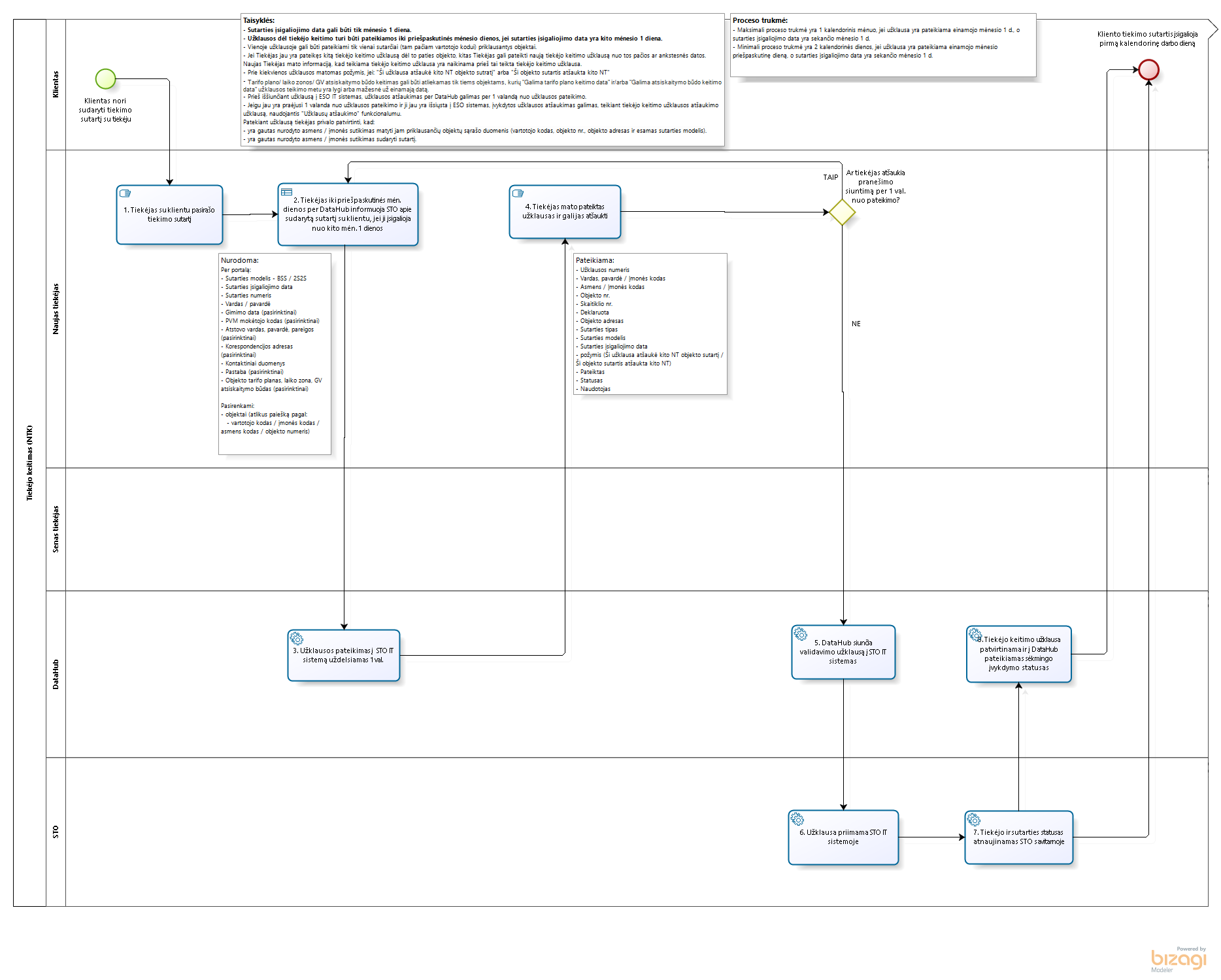
- Procesui taikomos taisyklės aprašytos aukščiau esančioje skiltyje „DH-510-3 Tiekėjo keitimo proceso taisyklės“.
UŽKLAUSOS „TIEKĖJO KEITIMAS„ TEIKIMO ŽINGNSIAI:
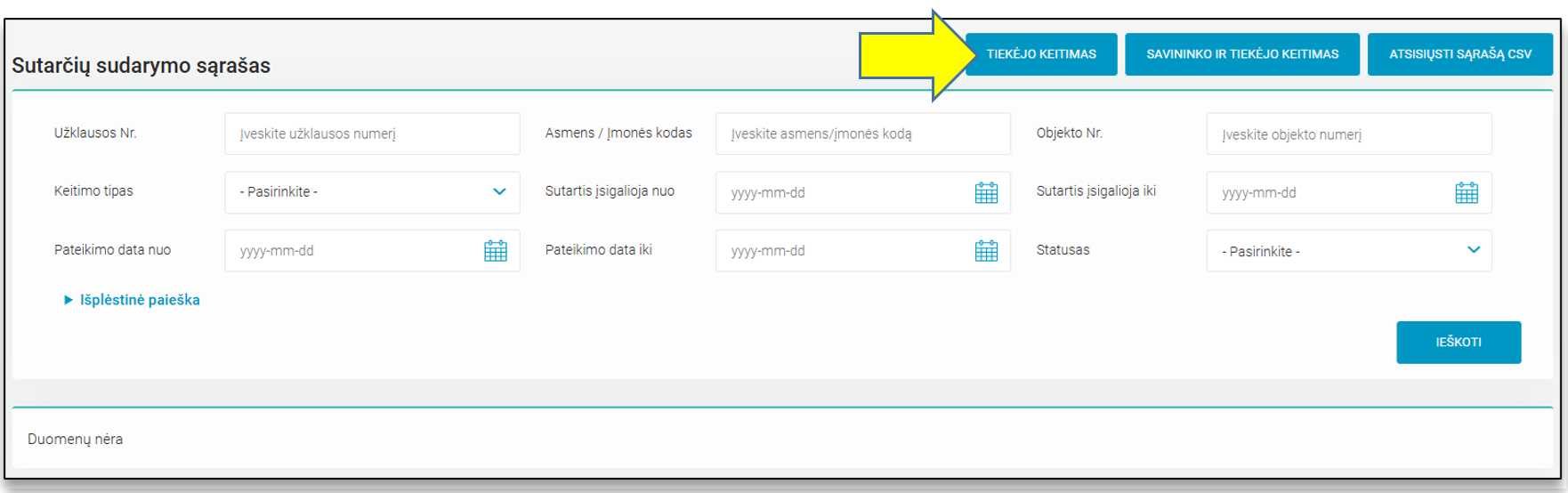
- Naujos tiekėjo keitimo užklausos pateikimas yra inicijuojamas sistemos naudotojui pasirinkus meniu punktą „Sutarčių sudarymas“ ir paspaudus mygtuką „TIEKĖJO KEITIMAS“.
- Po mygtuko paspaudimo sistemos naudotojas patenka į pirmąjį tiekėjo keitimo žingsnį „Objektų pasirinkimas“, kur turi galimybę atlikti objektų paiešką pagal: Vartotojo kodą, Asmens / Įmonės kodą, Skaitiklio nr., Objekto nr. Norėdamas surasti objektą (-us), kuriam (-iems) bus keičiamas tiekėjas, sistemos naudotojas turi suvesti bent vieną iš keturių duomenų, patvirtinti, kad yra gautas nurodyto asmens / įmonės sutikimas matyti jam priklausančių objektų sąrašo duomenis ir paspausti mygtuką „IEŠKOTI“.

- Pagal nurodytus paieškos kriterijus duomenų mainų platformoje randami objektai.
- Pasirenkant objektus, kuriems norima pakeisti tiekėją, svarbu atsižvelgti į tai, kad objektų gali būti rodoma daugiau nei yra norima keisti tiekėją.
- Objektų sąraše ir paspaudus mygtuką „Rodyti daugiau“ pateikiami procese dalyvaujantys objekto savininko ir objekto duomenys, aprašyti aukščiau esančioje skiltyje „Tiekėjo keitimo proceso duomenys“.
- Paspaudus "Rodyti daugiau" matomoje informacinėje lentelėje „Objekto ateities tiekėjai“ galima matyti, ar objektui jau yra pateikta tiekėjo priskyrimo užklausų ateities datomis. Ši informacija gali padėti identifikuoti, ar teikiama Tiekėjo keitimo užklausa atšauks kitų tiekėjų pateiktas užklausas.

- Pasirinkus objektus, kuriems reikalingas tiekėjo keitimas, ir paspaudus mygtuką „TOLIAU“ sistemos naudotojas yra nukreipiamas į antrąjį procesinį žingsnį „Naujos sutarties duomenų įvedimas“.
- Šiame žingsnyje sistemos naudotojas turi privalomai nurodyti:
- Sutarties įsigaliojimo datą
- pasirinkti Sutarties modelį (jei 1 žingsnyje buvo pažymėtas daugiau nei vienas objektas, tai sutarties modelis yra parenkamas visiems objektams, skirtingu sutarties modelių kiekvienam objektui individuliai pasirinkti negalima)
- Sutarties numerį.
- Proceso „Tiekėjo keitimas" atveju laukai „Sutarties savininko / nuomininko asmens tipas ir Sutarties tipas yra neredaguojami.
- Svarbu: Sutarties įsigaliojimo data turi būti pasirenkama iš kalendoriaus ir gali būti tik pirma mėnesio diena. Artimiausias galimas mėnuo nustatomas pagal konfigūracinį parametrą, kuris yra suderintas su rinka. Šiuo metu – sekančio mėnesio pirmą dieną rinktis galima iki einamojo mėnesio priešpaskutinės dienos imtinai.

- Įvedus naujos sutarties duomenis ir paspaudus mygtuką „TOLIAU“, jis yra nukreipiamas į trečiąjį procesinį žingsnį „Savininko duomenų įvedimas“.
- Visos procesui taikomos taisyklės aprašytos aukščiau esančioje skiltyje „Tiekėjo keitimo proceso taisyklės“.


- Įvedus korektiškus savininko duomenis ir paspaudus mygtuką „TOLIAU“, jis yra nukreipiamas į ketvirtąjį procesinį žingsnį „Objekto (-ų) duomenų įvedimas“.
- Šiame žingsnyje sistemos naudotojas mato objektų, kuriuos pasirinko pirmame procesiniame žingsnyje, sąrašą.
- Sąraše pateikiama informacija apie konkretų objektą:
- Objekto nr.;
- Sutarties modelis;
- Tarifo planas;
- Laiko zona.
- Prie kiekvieno sąraše matomo objekto yra pateikiama redagavimo ikona (pieštukas) bei statusas: Nepakeista, Pakeista.
- Jeigu yra reikalinga keisti tarifo planą ir/arba laiko zoną, ir/arba GV atsiskaitymo būdą, tą inicijuoti galima paspaudus redagavimo ikoną (pieštuką).

- Paspaudus redagavimo ikoną (pieštuką), matomą objektų sąraše, sistemos naudotojui atveriamas konkretaus objekto duomenų redagavimo forma.
- Primename:
- Jeigu redaguojami buitinės sutarties objekto duomenys, keisti galima tiek tarifo planą, tiek laiko zoną;
- Jeigu redaguojami verslo sutarties objekto duomenys – tik laiko zoną;
- Jeigu objektas yra GV (gaminantis vartototojas), keisti galima ir GV atsiskaitymo būdą.

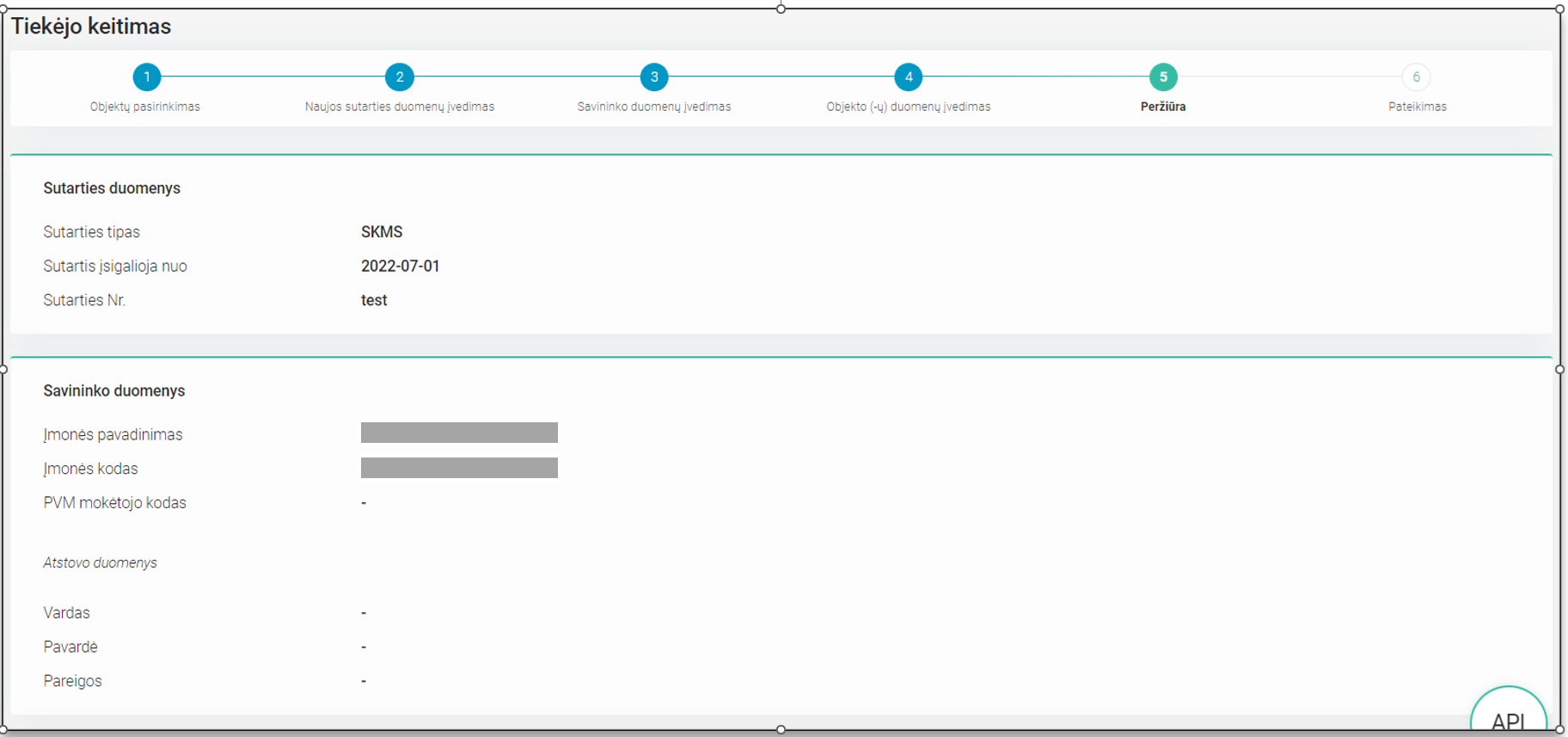
- Po mygtuko „SAUGOTI“ paspaudimo sistemos naudotojas yra nukreipiamas į penktąjį procesinį žingsnį „Peržiūra“, kur gali peržiūrėti tiekėjo keitimo užklausos metu pateiktus duomenis.
- Peržiūros žingsnyje sistemos naudotojas gali grįžti į prieš tai buvusius žingsnius, spausdamas mygtuką „ATGAL“, arba
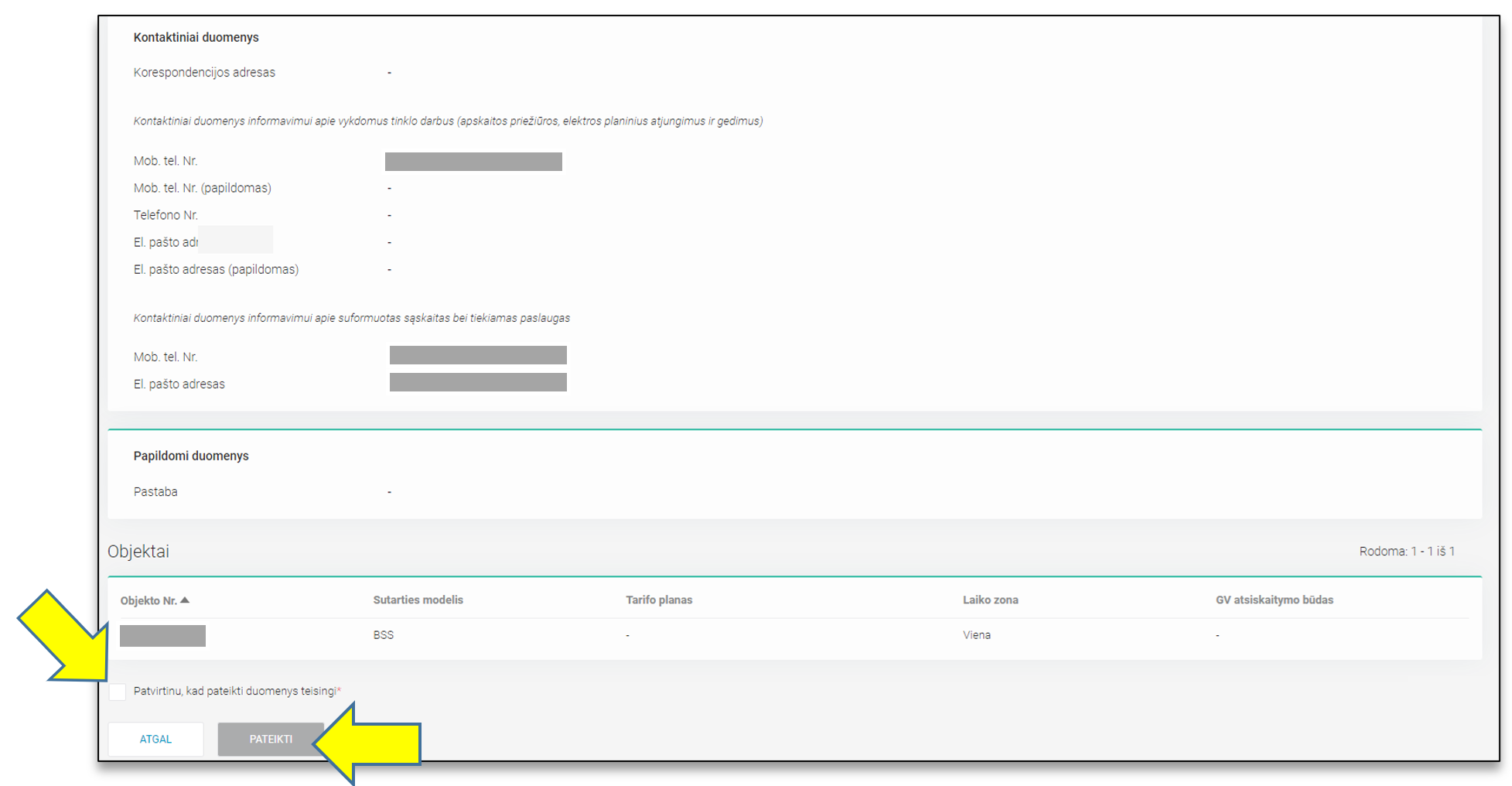
- Įsitikinęs, jog pateikti duomenys yra korektiški ir pažymėjęs žymimąjį langelį „Patvirtinu, kad pateikti duomenys yra teisingi“, pateikti tiekėjo keitimo užklausą spaudžiant mygtuką „PATEIKTI“.
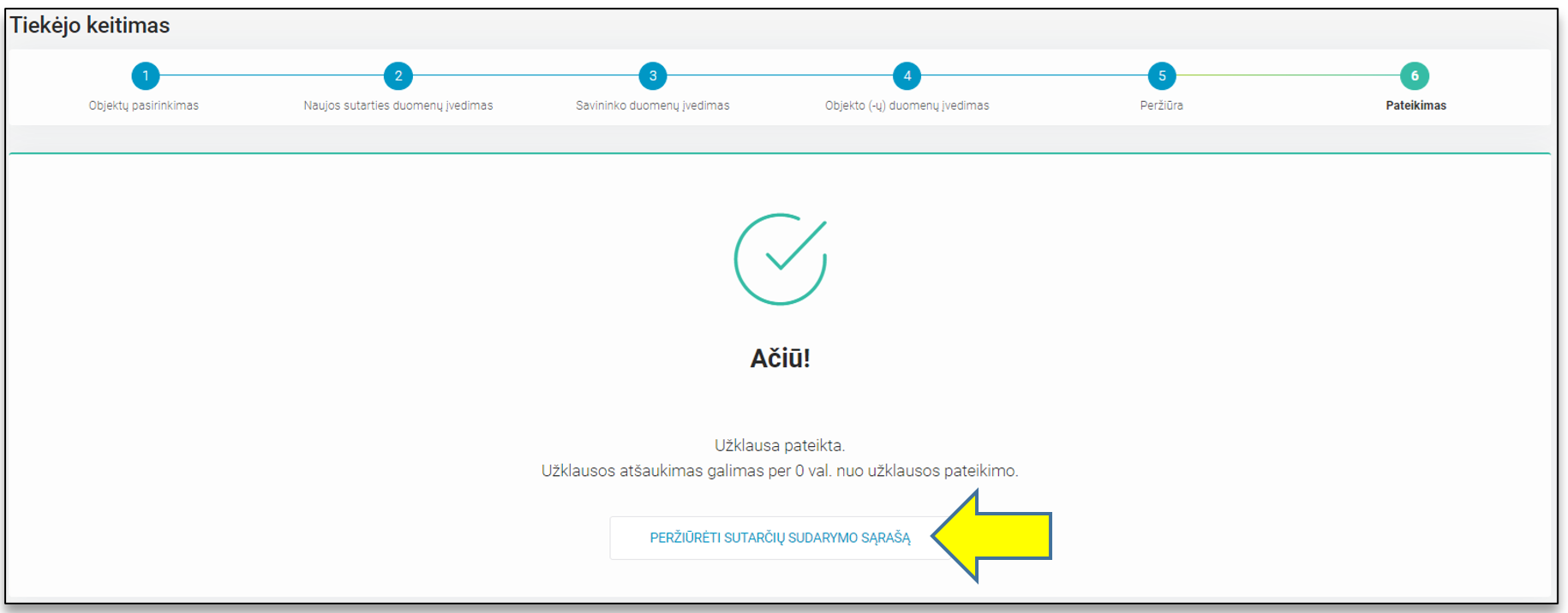
- Po mygtuko „PATEIKTI“ paspaudimo, sistemos naudotojas yra nukreipiamas į šeštąjį procesinį žingsnį, kuriame pateikiamas užklausos sukūrimo sėkmės pranešimas.
DH-510 Supplier change
The Supplier Change (further referred to as the NTK) functionality is intended to inform the distribution operator about a new supply contract concluded with the customer for specific objects attached to it.
This functionality is used when:
- The customer has already signed a supply contract with the supplier;
- The owner of the object is not being changed (see the description of the process "Change of Owner and Supplier press here ").
| Relevance date | Chapter | Change description |
|---|---|---|
| 2025-08-01 | - | New documentation structure |
MAIN RULES:
| No. | Rule | Additional information |
| 1. | The contract effective date can only be the 1st day of the month. | Currently, you can choose the first day of the next month up to and including the penultimate day of the current month. |
| 2. | If the contract entry date is the 1st day of the following month, the supplier change (further - NTK) request must be submitted by the penultimate day of the current month. | This is so that there is at least one day left before the contract entry date and if necessary, the submitted request can be canceled. Example:
|
| 3. | In one request, the supplier can only be changed for objects belonging to one contract (same user code). | - |
| 4. | If Supplier1 has already submitted an NTK1 request for object X, Supplier2 may submit an NTK2 request "on top" for the same object X from the same or an earlier date. |
|
| 5. | Before sending the request for execution to ESO IT systems, cancellation of the request via DataHub is possible within 1 hour of its submission. | If the supplier is changed for more than one object in the request, canceling the request cancels it for all objects in the request. |
| 6. | If 1 hour has passed since the request was submitted and it has already been sent to ESO IT systems, the completed request can be canceled by submitting a request to cancel the supplier change request using the "Cancel Requests" functionality. | Please see: https://datahub.eso.lt/dh-660-uzklausu-atsaukimas |
| 7. | When submitting a request, the supplier must confirm that:
| - |
| 8. | In case of supplier change, the fields "Contract owner/tenant person type" and "Contract type" are not editable. |
|
| 9. | Changing the tariff plan/time zone/GV billing method can only be done for those objects whose "Possible tariff plan change date" at the time of the request is equal to or less than the current date. | Changing the tariff plan/time zone/GV billing method can only be done for those objects whose "Possible tariff plan change date" at the time of the request is equal to or less than the current date. |
| 10. | The selected tariff plan will only take effect from the contract entry date specified in the request at the earliest. |
|
| 11. | There is no option to import queries when uploading lists to the system. | - |
| 12. | In the list of submitted queries, entries are presented at the object level (i.e. if the submitted query contains more than one object, each one will be presented in a separate row in the list). | - |
| 13. | The list only shows notifications that have been submitted since 2022-01-01 or notifications submitted before 2022-01-01, but whose contract entry date has not yet expired. Historical entries earlier than 2022-01-01 are not visible in the list. | - |
When requesting a supplier change, the following data must be provided:
| No. | Data | Additional information |
| 1. | Effective date of the contract | - |
| 2. | Contract model |
|
| 3. | Contract number | The number of the contract concluded between the supplier and the customer. |
| 4. | Contact information |
TEXT: The contact info already exists and cannot be edited. Since the supplier assignment is in progress, we assume that there is no contract with the supplier yet, so it is provided encrypted. The contact info already exists, but it is additional, not the main, so its adjustment is possible by clicking the edit icon. Since the supplier assignment is in progress, we assume that there is no contract with the supplier yet, so it is provided encrypted. The contact info already exists and cannot be edited. Since the supplier assignment is in progress, we assume that there is no contract with the supplier yet, so it is provided encrypted. The contact info already exists, but it is additional, not the main, so its adjustment is possible by clicking the edit icon. Since the supplier assignment is in progress, we assume that there is no contract with the supplier yet, so it is provided encrypted. The contact info already exists and cannot be edited. Since the supplier assignment is in progress, we assume that there is no contract with the supplier yet, so it is provided encrypted. There is no contact info , so the field is not encrypted and active, it is additional, so it can be submitted. There is no contact info, so we can see that the field is not encrypted, but it is still inactive and entry is not possible, because for this contact block "accounts" (in system you will see "sąskaitos"), one of the main contacts "mobile phone number" (in system you will see "Mob. tel. nr.") is already entered, so editing any main contacts in this block is not possible. |

Data that is not mandatory:
| No. | Data | Additional information |
| 1. | Correspondence address (in system you will see "Korespondencijos adresas") | - |
| 2. | Notes (in system you will see "Pastabos") | This is so that there is at least one day left before the contract entry date and if necessary, the submitted request can be canceled. Example:
|
| 3. | Rate plan / time zone / GV billing method (in system you will see "Tarifo planas / laiko zona / GV atsiskaitymo būdas") |
|
| Data | Description | JSON |
|---|---|---|
| Customer code (Vartotojo kodas) | Customer code of the customer with whom the contract has been concluded. | consumerCode |
| Metering device number (Skaitiklio Nr.) | Metering device number in the object. | meterNumber |
| Objekto Nr. (Object number) | Unique object number from the list when searched by user code, personal / company code or object number. | objectNumber |
| Client code (Asmens / Įmonės kodas) | Customer's company / person code to which the object belongs | personCode |
| Contract number (Sutarties Nr.) | Contract number | supplierContractNo |
| Contract start date (Sutartis įsigalioja nuo) | Date of entry into force of the notification subject to the independent supplier from | contractStart |
| Contract model (Sutarties modelis) | Contract model of the current object. Possible meanings: • BSS - General contract bills; • 2S2S - Two contracts – Two bills | contractModel |
Contract owner/tenant person type (Sutarties savininko / nuomininko tipas) | Contract owner / tenant person type. Possible meaning: • Individual; • Juridical. | subjectType |
| Agreement type (Sutarties tipas) | Indicates agreement type. Can be: - BSS - 2S2S | contractType |
| Name (Vardas) | Client name | personName |
| Surname (Pavardė) | Client surname | personSurname |
| Date of birth (Gimimo data) | Client date of birth | birthDate |
| Mobile phone number (Mob. tel. Nr.) | Mobile phone number of the object representative | mobPhoneNoNetwork |
| Telephone No. (Telefono Nr.) | Telephone number of the facility representative | telPhoneNoNetwork |
| Email address (El. Pašto adresas) | Object email address | emailNetwork |
| Correspondence address (Korespondencinis adresas) | Correspondence address of the client's company or natural person. | correspondenceAddress |
| Tariff plan (Tarifo planas) | The selected tariff plan. | tariffPlan |
| Time zone (Laiko zona) | The current time zone of the object. Possible values: • 1 - one; • 2 - two; • VR - one with reactive; • 4 - four (Smart); • DR - differentiated with reactive | timeZone |
| GV payoff method (GV atsiskaitymo būdas) | Chosen pay of method of the generating consumer. Possible meanings: • E – kWh – Recovered electricity; • G - kW – Power plant installed power; • M - kWh ir kW – Mixed; • P - % - Payment percentage. | payoffMethod |
| Status (Statusas) | Status of the request | status |
| Permissible power for use "Leistinoji naudoti galia" | Permitted power consumption of electricity in the object, kW | permitablePowerConsumption |
| Permitted generating power "Leistinoji generuoti galia" | Permitted power of electricity generation at the object, kW | permitablePowerGeneration |
| Average consumption "Suvartojimo vidurkis" | Average consumption of the object over the last 12 months | consumptionAverage |
| Average consumption calculation date "Suvartojimo vidurkio skaičiavimo data" | Date when the average consumption was calculated | consumptionAverageCalculationDate |
| Number of months for averaging "Vidurkio skaičiavimo mėnesių skaičius" | Number of months from which the average consumption was calculated. Max - 12 | consumptionAverageCalculationMonthsCount |
| VĮ RC object NTR/Unique room number "VĮ RC objekto NTR / Unikalus patalpų Nr." | Real estate register (NTR) of the object of the contract of the State Enterprise Registers Center or Unique premises number. | objectNtr |
| Accounting type "Apskaitos tipas" | Possible values:
| accountingType |
| Possible date for changing the tariff plan "Galima tarifo plano keitimo data" | The nearest possible date for changing the tariff plan | tariffPlanChangeDate |
| "Supplier" | Object supplier type:
| supplierType |
| Supplier object "Tiekėjo objektas" | Shows whether the object belongs to the supplier | supplyOwnership |
| Effective date of the agreement "Sutarties įsigaliojimo data" | Date from which the object belongs to the supplier | contractStart |
| Termination date "Sutarties nutraukimo data" | Date until which the object belongs to the supplier | contractEnd |
| Group "Grupė" | The amount of electricity supplied to the network and accumulated by objects included in the general accounting group is calculated as a common number. | generatingGroup |
| Object priority in the group "Objekto prioritetas grupėje" | The priority number is divided into groups according to the amount of electricity supplied and accumulated by the objects included in the group. | generatingObjectPriorityGroup |
| Supply status "Tiekimo būsena" | The object power supply status code. Possible values: · T – Supplied; · P - Disconnected by request · A - Disconnected due to sanction · R - Restricted by sanction If there are changes in the supply status, all change statuses will be displayed in different rows in the report. | supplyState |
| Delivery status valid from "Tiekimo būsenos galiojimas nuo" | Start of validity of the energy supply status | supplyStateFrom |
| Supply status valid until "Tiekimo būsenos galiojimas iki" | Power supply status expiration. | supplyStateTo |
| Future Supplier Name "Ateities Tiekėjo pavadinimas" | The supplier with whom the contract was concluded is indicated. | objectFutureSuppliers |
| Effective date of the agreement "Sutarties įsigaliojimo data" | Date from which the object belongs to the supplier | contractStart |
| Termination date "Sutarties nutraukimo data" | Date until which the object belongs to the supplier | contractEnd |
| Power plant type "Elektrinės tipas" | Power plant type. Possible values:
| powerPlantType |
| Type of producing user "Gaminančio vartotojo tipas" | Indicated: · Producing consumer/Remote producing consumer | generatingObjectType |
| Power Plant No. "Elektrinės Nr." | The number of the power plant in use. | powerPlantObjectNumber |
| Producing consumer from "Gaminantis vartotojas nuo" | Date of object becoming a GV from | powerPlantValidFrom |
| Producing consumer up to "Gaminantis vartotojas iki" | Date of object becoming a GV by | powerPlantValidTo |
| Producer user accounting schem "Gaminančio vartotojo apskaitos schema" | Gaminančio vartojojo apskaitos schema. Galimos reikšmės:
| accountingType |
| The producer consumer accounting scheme is valid from "Gaminančio vartotojo apskaitos schema galioja nuo" | Effective date of the producer consumer accounting scheme | accountingSchemeValidFrom |
| The accounting scheme of the producer consumer is valid until "Gaminančio vartotojo apskaitos schema galioja iki" | Expiration date of the producer consumer's accounting scheme. | accountingSchemeValidTo |
| Possible accounting chart change date "Galima apskaitos schemos keitimo data" | The earliest possible change date for changing the accounting scheme | accountingSchemeChangeDate |
| Possible date of change of payment method of the producing consumer "Galima gaminančio vartotojo atsiskaitymo būdo keitimo data" | The nearest possible date for changing the payment method of GV | payoffMethodChangeDate |
| Power used "Naudojama galia" | Power plant power is used, kW | generatingPower |
| Notes "Pastabos" | Notes | notes |
| Request number "Užklausos Nr." (WEB) | Submitted request/order number | - |
| Change type "Keitimo tipas" (WEB) | Search filter to distinguish between "Supplier Change" or "Owner and Supplier Change" | - |
| Order placed date from "Pateikimo data nuo" (WEB) | Search filter to narrow the search field by selecting when the query was submitted | - |
| Order placed date to "Pateikimo data iki" (WEB) | Search filter to narrow the search field by selecting when the query was submitted | - |
| Contarct start to "Sutartis įsigalioja iki" (WEB) | The date from which the contract comes into force is given in the request. | - |
| User "Naudotojas" (WEB) | User who submitted the request/ordered the report Note: Iš you see PUBLIC instead of user name, that means that order was sent using API integrations | - |
| Indication is "Yra požymis" (WEB) | Indicates that the submitted request has canceled a request/has been canceled a request submitted by another NT | - |
| Declared "Deklaruota" (WEB) | The attribute indicates whether meter readings were declared when submitting the request. | - |
Information is under preparation
We apologize for the inconvenience
DataHub team
!Note: Datahub do not have English user interface
STEPS FOR SUBMITTING A "CHANGE OF SUPPLIER" REQUEST:
- Submission of a new supplier change request is initiated by the system user selecting the menu item "Contracting" (in system you will see "Sutarčių sudarymas") and clicking the "SUPPLIER CHANGE" (in system you will see "TIEKĖJO KEITIMAS") button.

- The first step of changing the supplier, "Object Selection" (in system you will see "Objektų pasirinkimas"), where he has the opportunity to search for objects by: User code (in system you will see "Vartotojo kodas"), Person / Company code (in system you will see "Asmens / Įmonės kodas"), Meter No. (in system you will see "Skaitiklio Nr."), Object No. (in system you will see "Objekto Nr.") In order to find the object (s) for which the supplier will be changed, the system user must enter at least one of the four data, confirm that the consent of the specified person / company to see the ata of the list of objects belonging to him has been received and click the "SEARCH" (in system you will see "IEŠKOTI") button.
- Objects are found according to the specified search criteria.
- When selecting objects for which you want to change the supplier, it is important to consider that more objects may be displayed than you want to change the supplier.
- In the list of objects and by clicking the "Show more" (in system you will see "Rodyti daugiau") button, the data of the object owner and the object participating in the process are displayed, described in the "Supplier change process data" section above.
By clicking "Show more" (in system you will see "Rodyti daugiau"), in the information table "Future suppliers of the object" (in system you will see "Objekto ateities tiekėjai") visible, you can see whether the object has already been submitted for supplier assignment requests at future dates. This information can help identify whether the submitted Supplier change request will cancel requests submitted by other suppliers.
- After selecting the objects that require a change of supplier and clicking the "NEXT" (in system you will see "TOLIAU") button, the system user is directed to the second procedural step "Entering new contract data" (in system you will see "Naujos sutarties duomenų įvedimas").
- In this step, the system user must specify:
- Contract effective date;
- select the Contract model (if more than one object was selected in step 1, the contract model is selected for all objects; different contract models cannot be selected for each object individually);
- agreement number;
- The fields "Contract Owner/Lessee Person Type" and "Contract Type" are not editable.
Important: The contract effective date must be selected from the calendar and can only be the first day of the month. The nearest possible month is determined by a configuration parameter that is compatible with the market. Currently, the first day of the following month can be selected up to and including the penultimate day of the current month.
After entering the new contract data and clicking the "NEXT" (in system you will see "TOLIAU") button, it is directed to the third process step "Entering Owner Data" (in system you will see "Savininko duomenų įvedimas"). All rules applicable to the process are described in the "Supplier Change Process Rules" section above.
- After entering the correct owner data and clicking the "NEXT" (in system you will see "TOLIAU") button, the user is directed to the fourth process step "Entering object(s) data" (in system you will see "Objekto (-ų) duomenų įvedimas").
- In this step, the system user sees a list of the objects they selected in the first process step.
- The list provides information about a specific object:.
- Object No.;
- Contract Model;
- Tariff Plan;
- Time Zone;
- GV Payment Method.
- Each object visible in the list is accompanied by an editing icon (pencil) and a status: Unchanged (in system you will see "Nepakeista"), Changed (in system you will see "Pakeista").
If it is necessary to change the tariff plan and/or time zone and/or GV billing method, this can be initiated by clicking the edit icon (pencil).
- By clicking the edit icon (pencil) visible in the list of objects, you can open a form for editing data for a specific object.
- We remind you:
- If you are editing the data of a household contract object, you can change both the tariff plan and the time zone;
- If you are editing the data of a business contract object, you can only change the time zone;
- If the object is a GV (producer consumer), you can also change the GV billing method.
15. After clicking the "SAVE" (in system you will see "SAUGOTI") button, the system user is directed to the fifth process step "Review" (in system you will see "Peržiūra"), where they can review the data provided during the supplier change request.
16. In the review step, the system user can return to previous steps by pressing the "BACK" (in system you will see "ATGAL") button, or after making sure that the data provided is correct and checking the checkbox "I confirm that the data provided is correct" (in system you will see "Patvirtinu, kad pateikti duomenys teisingi"), submit the supplier change request by clicking the "SUBMIT" (in system you will see "PAKTEIKTI") button.
17. After clicking the "SUBMIT" (in system you will see "Pateikti") button, the system user is directed to the sixth process step, where a message is displayed indicating the success of the request creation.