DH-650 Kontaktų keitimas

Kontaktų keitimo (toliau - KK) funkcionalumas yra vienas iš tiekėjo jau turimų sutarčių su klientu administravimo procesų, skirtas tiekėjui informuoti skirstymo operatorių apie objekto savininko kontaktinių duomenų pasikeitimą.
 

Šis funkcionalumas yra naudojamas, kai:

  • Reikalingas kontaktų keitimas objektui, dėl kurio tiekėjas turi galiojančią sutartį su esamu objekto savininku.

Kontaktų keitimas proceso pokyčiai
Aktualu nuoSkyriusPokyčio aprašymas
2025-08-01-Nauja dokumentacijos strukūra
   
   
Kontaktų keitimas proceso taisyklės

PAGRINDINĖS TAISYKLĖS:

Eil. Nr.TaisyklėPapildoma informacija
1.Kai inicijuojamas procesas "Kontaktų keitimas", tiekėjas per Data Hub susirasti ir kliento kontaktų keitimą inicijuoti gali tik jam užklausos teikimo metu priklausantiems klientams.-
2.Kontaktų keitimas yra atliekamas vartotojo kodo (t.y. ESO sutarties) lygmenyje.
  • Vartotojo kodas yra atitikmuo ESO ir kliento sutarčiai. 
  • Funkcionalumas yra skirtas keisti kliento sutarties kontaktus.
  • Esant poreikiui, SKMS sutarties atveju kontaktą nurodyti galima ir objekto lygmenyje.
3.

SBTS (buitinės) sutarties atveju keičiant kontaktus nurodyti galima:

  • Sutarties kontaktus dėl vykdomų darbų ir gedimų:
    • Korespondencijos adresą
    • Mob. tel. nr.
    • Papildomą mob. tel. nr.
    • El. pašto adresą
    • Papildomą el. pašto adresą
-
4.

SKMS (komercinės) atveju keisti galima:

  • Sutarties kontaktus dėl vykdomų darbų ir gedimų:
    • Korespondencijos adresą
    • Mob. tel. nr.
    • Papildomą mob. tel. nr.
    • El. pašto adresą
    • Papildomą el. pašto adresą
  • Sutarties kontaktus dėl sąskaitų:
    • Mob. tel. nr. 
    • Telefono nr.
    • El. pašto adresas
    • Objekto kontaktą dėl gedimų:
      • Mob. tel. nr.

SKMS sutarties atveju mobilų telefono numerį (-ius) ir / arba El. pašto adresą (-us) nurodyti galima tik tokiu atveju jei sutartis ir kiekvienas duomenų įvedimo blokas nei vieno iš šių konaktų dar neturi.

Toks ribojimas yra įvestas, siekiant suvaldyti riziką pakeisti kontaktus įmonėms, turinčioms daug objektų ir skirtingus jų atstovus.

5.Vienoje užklausoje kontaktų keitimas galimas vienai sutarčiai arba tik vienos sutarties objektams, jei tai SKMS sutartis.-
6.Užklausų importavimas sąrašais nėra galimas.-
7.Jeigu jau yra praėjusi 1 valanda nuo užklausos pateikimo ir ji jau yra išsiųsta į ESO IT  sistemas, įvykdytos užklausos atšaukimas galimas, teikiant tiekėjo keitimo užklausos atšaukimo užklausą, naudojantis "Užklausų atšaukimo" funkcionalumu.Užklausu atšaukimas 
Kontaktų keitimas proceso duomenys
DuomuoAprašasJSON
Užklausos Nr.Kontakt7 keitimo pranešimo numeris (ID)notificationId
Vardas, pavardė / Įmonės pavadinimasKliento įmonės pavadinimas arba, jei klientas yra fizinis asmuo, - asmens vardas ir pavardėpersonName; personSurname
Asmens / Įmonės kodasKliento įmonės, kuriai priklauso objektas, įmonės kodas arba asmens kodo atvaizdavimas.personCode
Vartotojo kodasKliento, su kuriuo sudaryta sutartis, vartotojo kodas.consumerCode
Objekto Nr.Unikalus objekto numerisobjectNumber
Objekto adresasObjekto adresas.objectAddress
Sutarties tipasNurodomas sutarties tipas:
-SKMS komercinė
-SBTS buitinė.
contractType
Korespondencijos adresasAdresas gauti korespondencijaicorrespondenceAddress
Mob. tel. Nr. - tinklaiMob. tel. Nr.mobPhoneNoNetwork
Mob. tel. Nr. (papildomas) - tinklaiMob. tel. Nr. (papildomas)mobPhoneNo2Network
Telefono Nr. - tinklaiTelefono NrphoneNoNetwork
El. pašto adresas - tinklaiEl. pašto adresas - tinklaiemailNetwork
El. pašto adresas (papildomas) - tinklaiEl. pašto adresas (papildomas) - tinklaiemail2Network
Mob. tel. Nr. - sąskaitosMob. tel. Nr. - sąskaitosmobPhoneNoInvoice
El. pašto adresas - sąskaitosEl. pašto adresas - sąskaitosemailInvoice
Objekto mob. tel. Nr.Objekto mob. tel. Nr.mobPhoneNoObject
Naujas korespondencijos adresasNaujas adresas gauti korespondencijainewCorrespondenceAddress
Naujas mob. tel. Nr. - tinklaiNaujas mob. tel. Nr. - tinklainewMobPhoneNoNetwork
Naujas mob. tel. Nr. (papildomas) - tinklaiNaujas mob. tel. Nr. (papildomas) - tinklainewMobPhoneNo2Network
Naujas telefono Nr. - tinklaiNaujas telefono Nr. - tinklainewPhoneNoNetwork
Naujas el. pašto adresas - tinklaiNaujas el. pašto adresas - tinklainewEmailNetwork
Naujas el. pašto adresas (papildomas) - tinklaiNaujas el. pašto adresas (papildomas) - tinklainewEmail2Network
Naujas mob. tel. Nr. - sąskaitosNaujas mob. tel. Nr. - sąskaitosnewMobPhoneNoInvoice
Naujas el. pašto adresas - sąskaitosNaujas el. pašto adresas - sąskaitosnewEmailInvoice
Naujas objekto mob. tel. Nr.Naujas objekto mob. tel. Nr.newMobPhoneNoObject
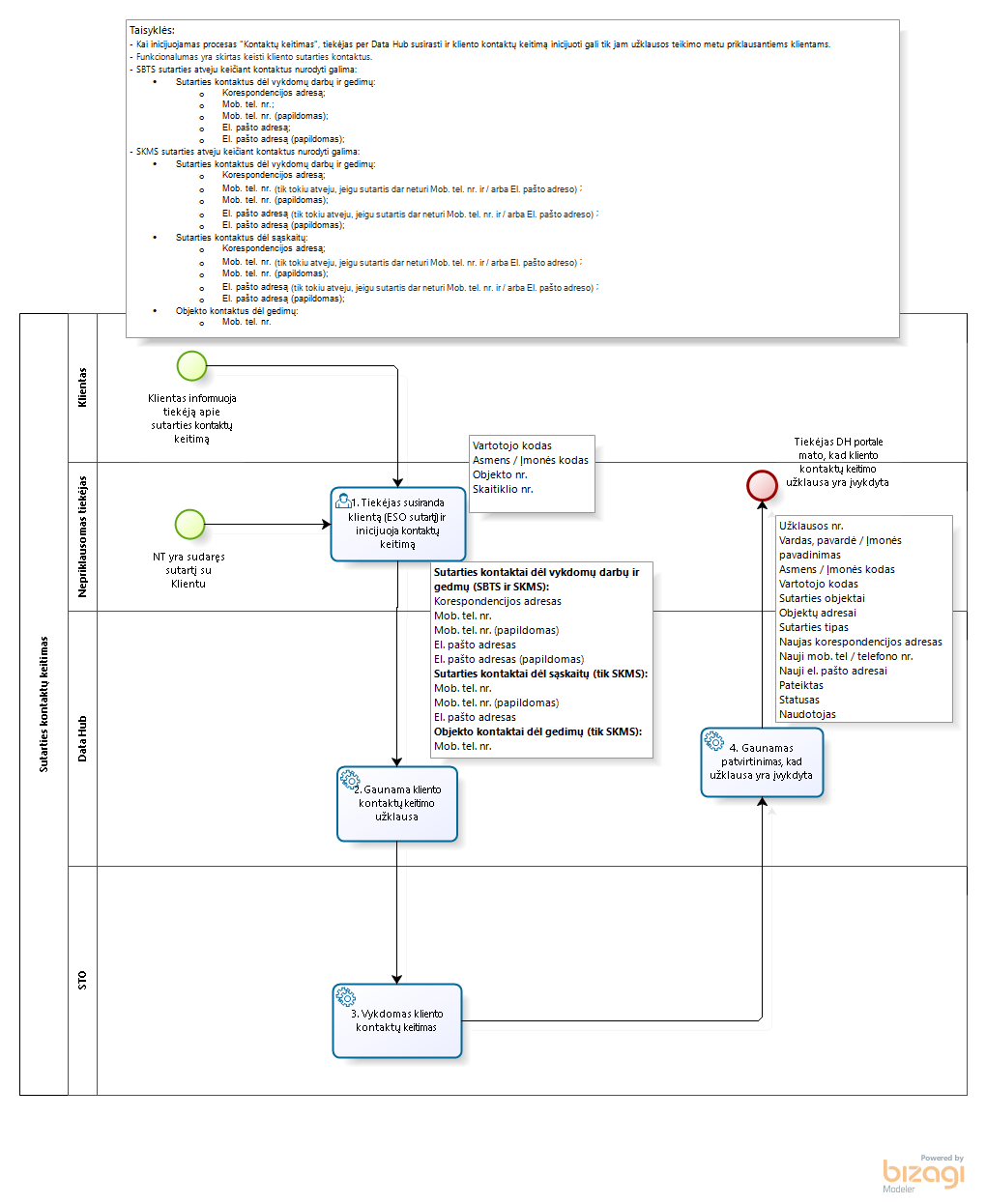
Kontaktų keitimas proceso schema
Kontaktų keitimas proceso WEB naudotojo instrukcija
  • Procesui taikomos taisyklės aprašytos aukščiau esančioje skiltyje „DH-650-1 Tiekėjo keitimo proceso taisyklės“.


UŽKLAUSOS „KONTAKTŲ KEITIMAS„ TEIKIMO ŽINGNSIAI:

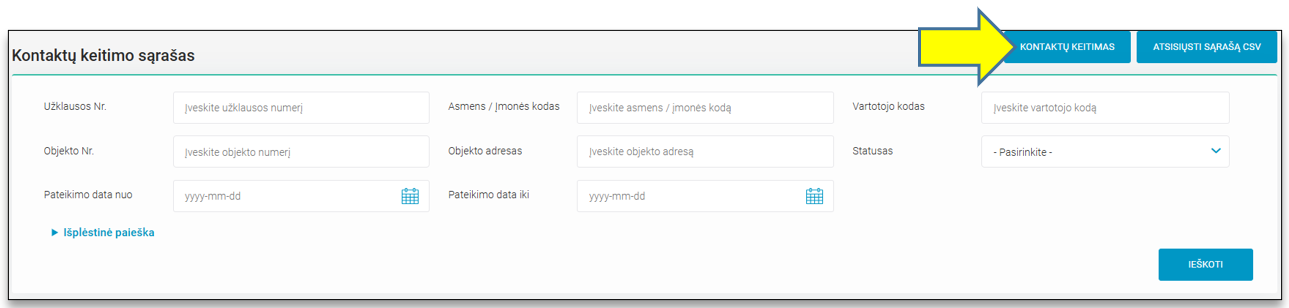
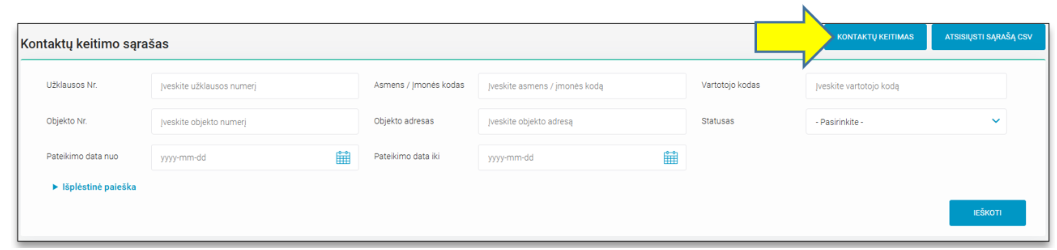
  1. Naujos kontaktų keitimo užklausos pateikimas yra inicijuojamas sistemos naudotojui pasirinkus meniu punktą „Sutarčių administravimas“, meniu papunktį „Kontaktų keitimas“ ir paspaudus mygtuką „KONTAKTŲ KEITIMAS“. 

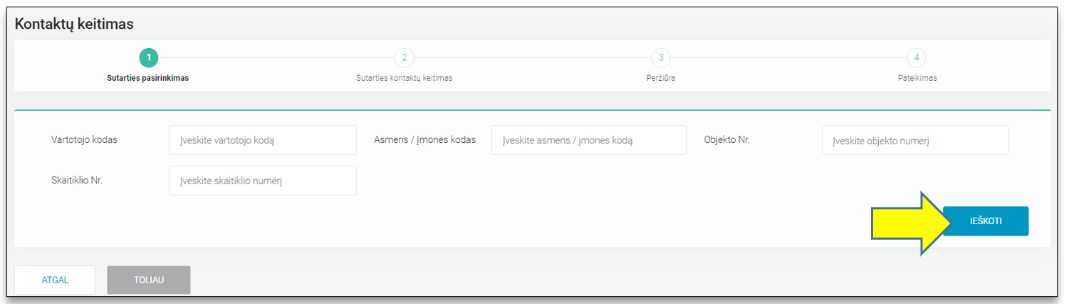
  2. Po mygtuko paspaudimo sistemos naudotojas patenka į pirmąjį kontaktų keitimo žingsnį „Sutarties pasirinkimas“, kur turi galimybę atlikti objektų paiešką pagal: Vartotojo kodą, Asmens / Įmonės kodą, Skaitiklio nr., Objekto nr. Norėdamas surasti sutartį, kuriai bus keičiami kontaktai, sistemos naudotojas turi suvesti bent vieną iš keturių duomenų ir paspausti mygtuką „IEŠKOTI“.
  1. Pagal nurodytus paieškos kriterijus duomenų mainų platformoje randama konkreti sutartis (-ys)
    • jeigu paieška atliekama pagal Asmens/ Įmonės kodą, randamos visos tam asmeniui ar įmonei priklausančios sutartys;
    • jeigu paieška atliekama pagal vartotojo kodą – randama konkreti sutartis;
    • jeigu paieška atliekama pagal objekto numerį – randama konkreti sutartis, kurioje yra paieškoje nurodytas objekto numeris;
    • jeigu paieška atliekama pagal skaitiklio numerį – randama konkreti sutartis, kurioje yra objektas, turintis paieškoje nurodytą skaitiklį.
  2. Primename, kad kontaktų keitimo užklausą vienu metu galima teikti tik vienos sutarties lygmenyje. 
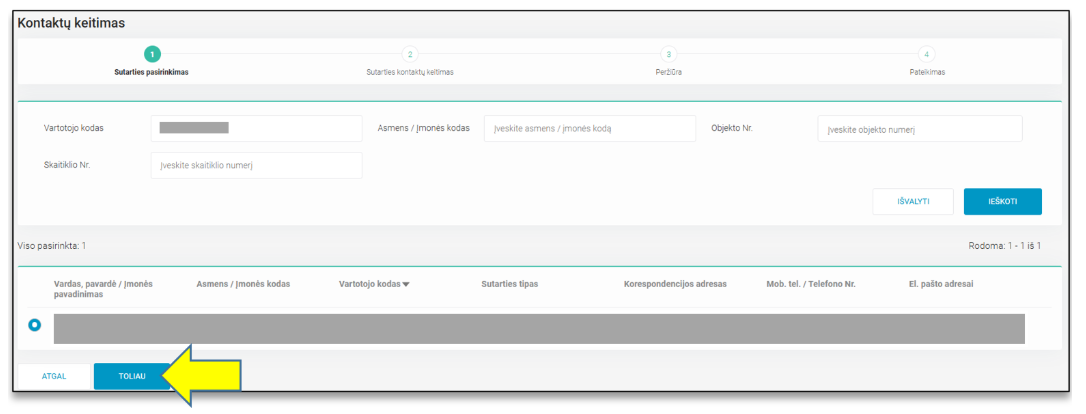
  3. Sutarčių sąraše pateikiami procese dalyvaujantys kliento ir jo sutarties su tiekėju duomenys, aprašyti aukščiau esančioje skiltyje „Kontaktų keitimas proceso duomenys“.
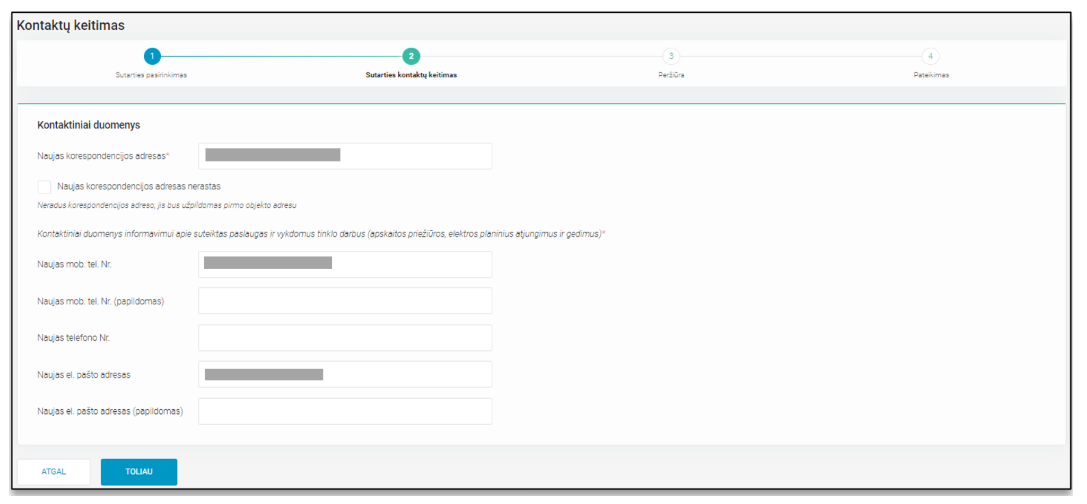
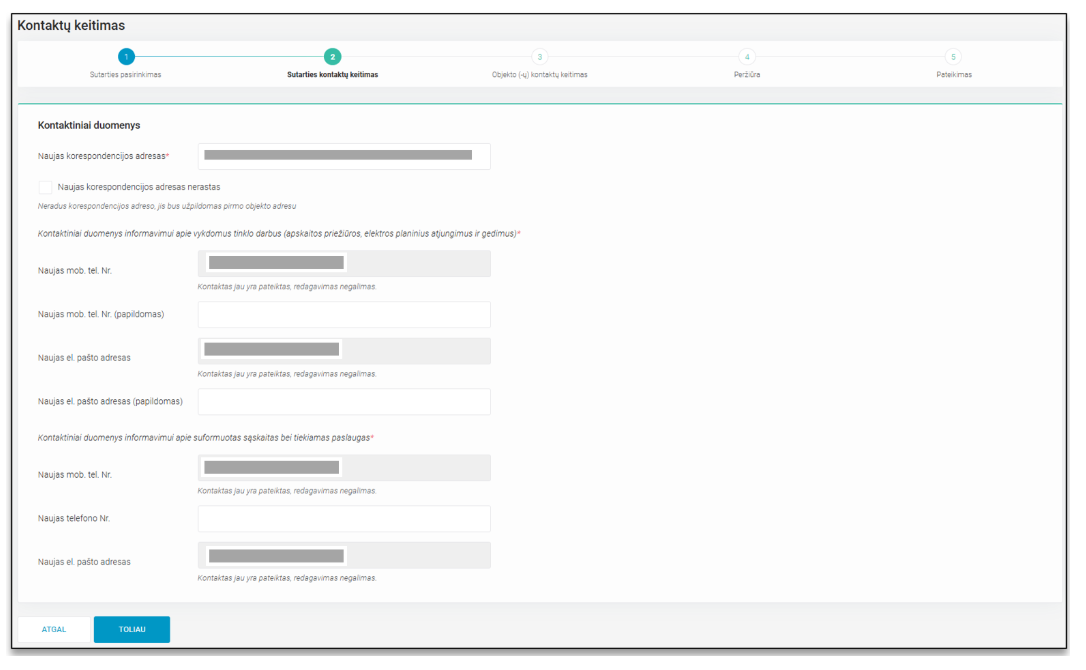
  1. Sistemos naudotojui pasirinkus sutartį, kuriai reikalingas kontaktų keitimas ir paspaudus mygtuką „TOLIAU“ jis yra nukreipiamas į antrąjį procesinį žingsnį „Sutarties kontaktų keitimas“. Šiame žingsnyje sistemos naudotojui pateikiama duomenų redagavimo forma:
  2. Jeigu 1 – ame žingsnyje "Sutarties pasirinkimas" pasirinkta SBTS tipo sutartis, naudotojas užpildyti gali (bet neprivaloma) šiuos laukus:
    • Naujas korespondencijos adresas
      • Klasifikatoriuje nerandus reikiamo adreso, yra galimybė pažymėti požymį „Naujas korespodencijos adresas nerastas“, tokiu atveju korespondencijos adreso eilutė yra užpildoma sutarties pirmojo objekto adresu.
      • Jeigu esamas korespondencijos adresas yra ištrinamas ir naujas nėra pateikiamas, yra gaunama klaida "Naujas korespondencijos adresas laukas yra privalomas".
    • Kontaktinius duomenis informavimui apie vykdomus tinklo darbus (apskaitos priežiūros, elektros planinius atjungimus ir gedimus)
    • Naujas mob. tel. nr.
    • Naujas mob. tel. nr. papildomas
    • Naujas el. pašto adresas
    • Naujas el. pašto adresas papildomas
      • Jeigu esami kontaktiniai duomenys yra ištrinami ir nauji nėra pateikiami, yra gaunama klaida "Bent vienas laukas yra privalomas: Naujas mob. tel. Nr., Naujas telefono Nr., Naujas el. pašto adresas".
  1. Jeigu 1 – ame žingsnyje "Sutarties pasirinkimas" pasirinkta SKMS tipo sutartis, naudotojas užpildyti gali (bet neprivaloma) šiuos laukus:
    • Naujas korespondencijos adresas
      • Klasifikatoriuje nerandus reikiamo adreso, yra galimybė pažymėti požymį „Naujas korespodencijos adresas nerastas“, tokiu atveju korespondencijos adreso eilutė yra užpildoma sutarties pirmojo objekto adresu.
    • Kontaktinius duomenis informavimui apie vykdomus tinklo darbus (apskaitos priežiūros, elektros planinius atjungimus ir gedimus)
      • Naujas mob. tel. nr.
        • Nurodyti galima tik tuo atveju, jeigu laukai "Naujas mob. tel. Nr." ir / arba "Naujas el. pašto adresas" nėra užpildyti esamais kontaktais. 
      • Naujas mob. tel. nr. papildomas
      • Naujas el. pašto adresas
        • Nurodyti galima tik tuo atveju, jeigu laukai "Naujas mob. tel. Nr." ir / arba "Naujas el. pašto adresas" nėra užpildyti esamais kontaktais.
      • Naujas el. pašto adresas papildomas
    • Kontaktinius duomenis informavimui apie suformuotas sąskaitas bei tiekiamas paslaugas:
      • Naujas mob. tel. nr.
        • Nurodyti galima tik tuo atveju, jeigu laukai "Naujas mob. tel. Nr." ir / arba "Naujas el. pašto adresas" nėra užpildyti esamais kontaktais. 
      • Naujas telefono nr.
      • Naujas el. pašto adresas
        • Nurodyti galima tik tuo atveju, jeigu laukai "Naujas mob. tel. Nr." ir / arba "Naujas el. pašto adresas" nėra užpildyti esamais kontaktais.

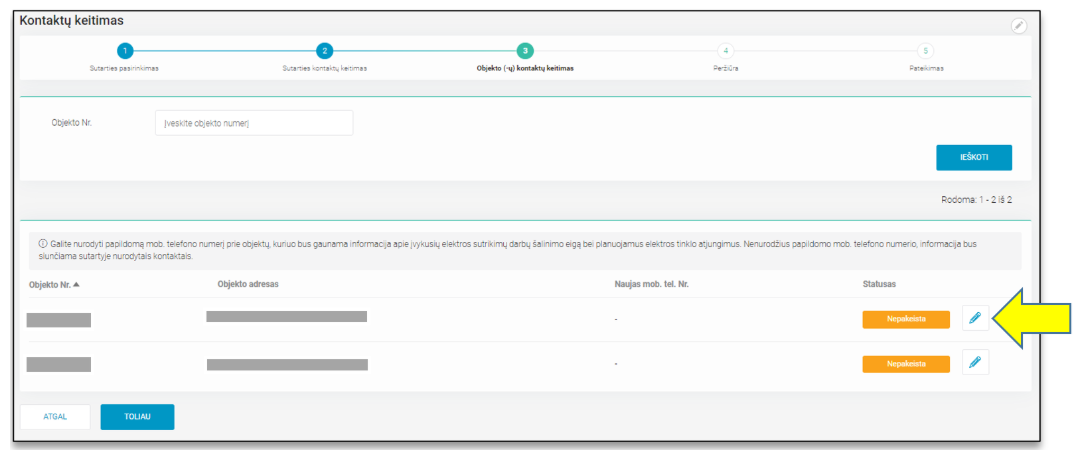
  1. SKMS sutarties atveju yra galimybė paredaguoti/ pateikti kontaktą prie konkretaus objekto. 
    • Sistemos naudotojui užpildžius duomenų redagavimo formą, esančią 2 - ame procesiniame žinsnyje, ir paspaudus mygtuką „TOLIAU“ jis yra nukreipiamas į 3 - ąjį procesinį žingsnį „Objekto (ų) kontaktų keitimas.
      • Šiame žingsnyje naudotojui pateikiamas visų po sutartimi esančių objektų sąrašas, kur prie kiekvieno individualiai yra galimybė nurodyti papildomą mob. telefono numerį, kuriuo bus gaunama informacija apie įvykusių elektros sutrikimų darbų šalinimo eigą bei planuojamus elektros tinklo atjungimus. 
      • Nenurodžius papildomo mob. telefono numerio, informacija bus siunčiama sutartyje nurodytais kontaktais.
  1. Sistemos naudotojui iš sąrašo pasirinkus objektą, kuriam norima paredaguoti/ pateikti kontaktą, ir paspaudus redagavimo ikonėlę , sistema aktyvuoja naujo mob. tel. nr. įvedimo lauką.
  1. Įvedus reikiamą kontaktą ir paspaudus išsaugojimo ikonėlę , naujas objekto kontaktas yra išsaugomas ir statusas pakeičiamas į „Pakeista“. Naujas kontaktas nėra įrašomas tol, kol nepaspaudžiama išsaugojimo ikonėlė. Jeigu sistemos naudotojas nori atstatyti prieš redagavimą buvusį kontaktą, tą padaryti gali paspaudęs atstatymo ikonėlę .
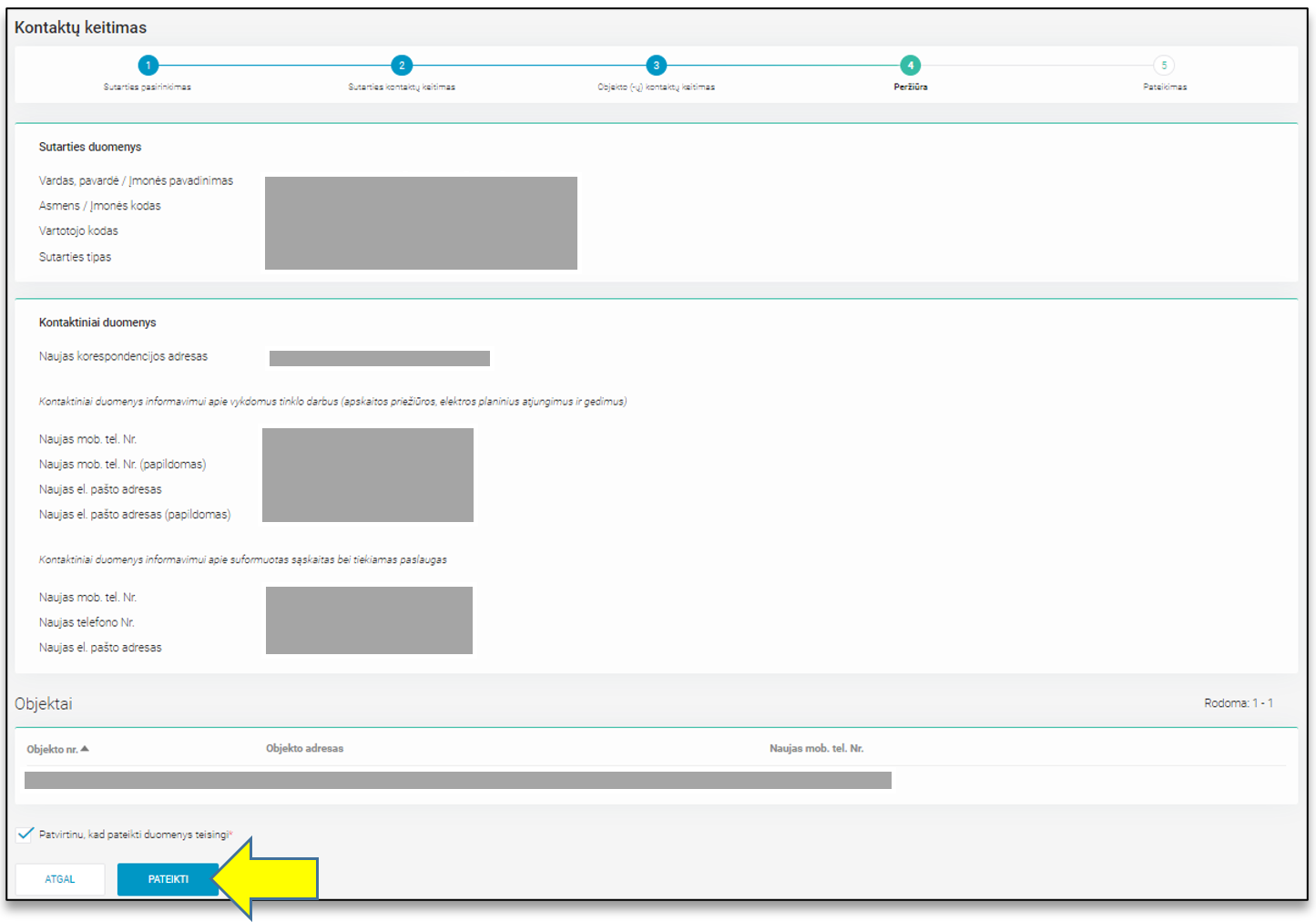
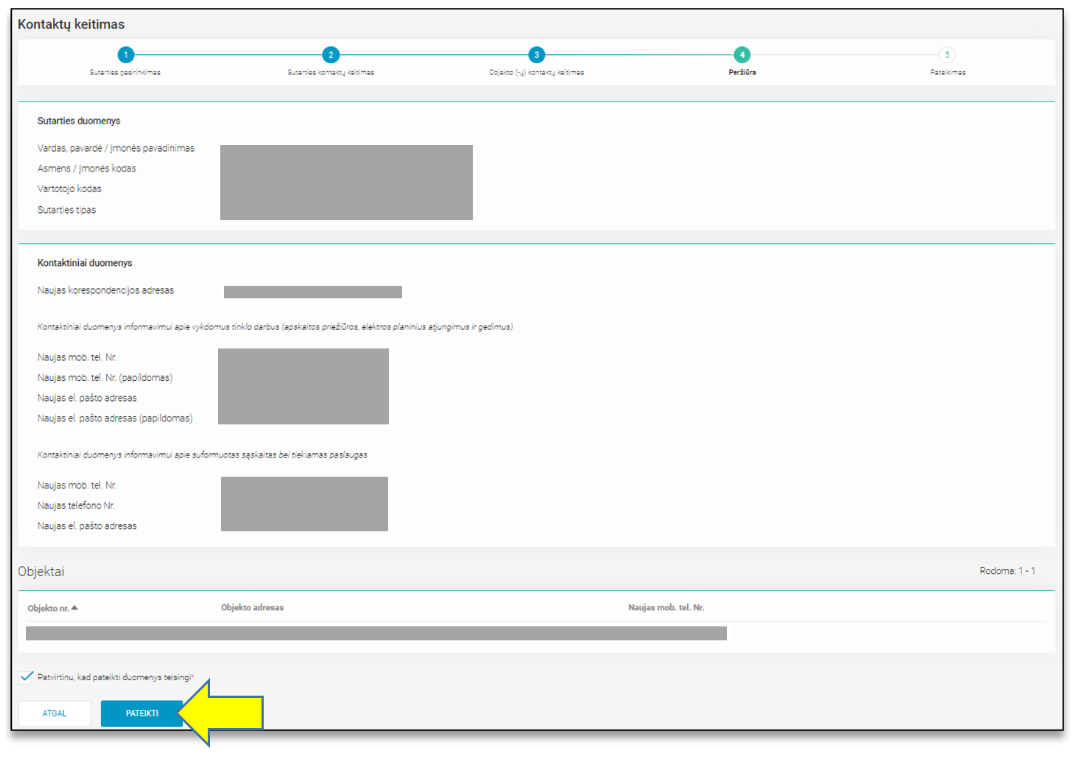
  2. Užpildžius visus norimus duomenis ir paspaudus mygtuką „TOLIAU“ sistemos naudotojas yra nukreipiamas į trečiąjį (SBTS sutarties atveju) arba į ketvirtąjį (SKMS sutarties atveju) procesinį žingsnį „Peržiūra“, kur gali pasitikrinti pateiktus duomenis.
  3. Peržiūros žingsnyje sistemos naudotojas gali grįžti į prieš tai buvusius žingsnius, spausdamas mygtuką „ATGAL“, arba
  4. Įsitikinęs, jog pateikti duomenys yra korektiški ir pažymėjęs žymimąjį langelį „Patvirtinu, kad pateikti duomenys yra teisingi“, pateikti tiekėjo keitimo užklausą spaudžiant mygtuką „PATEIKTI“.
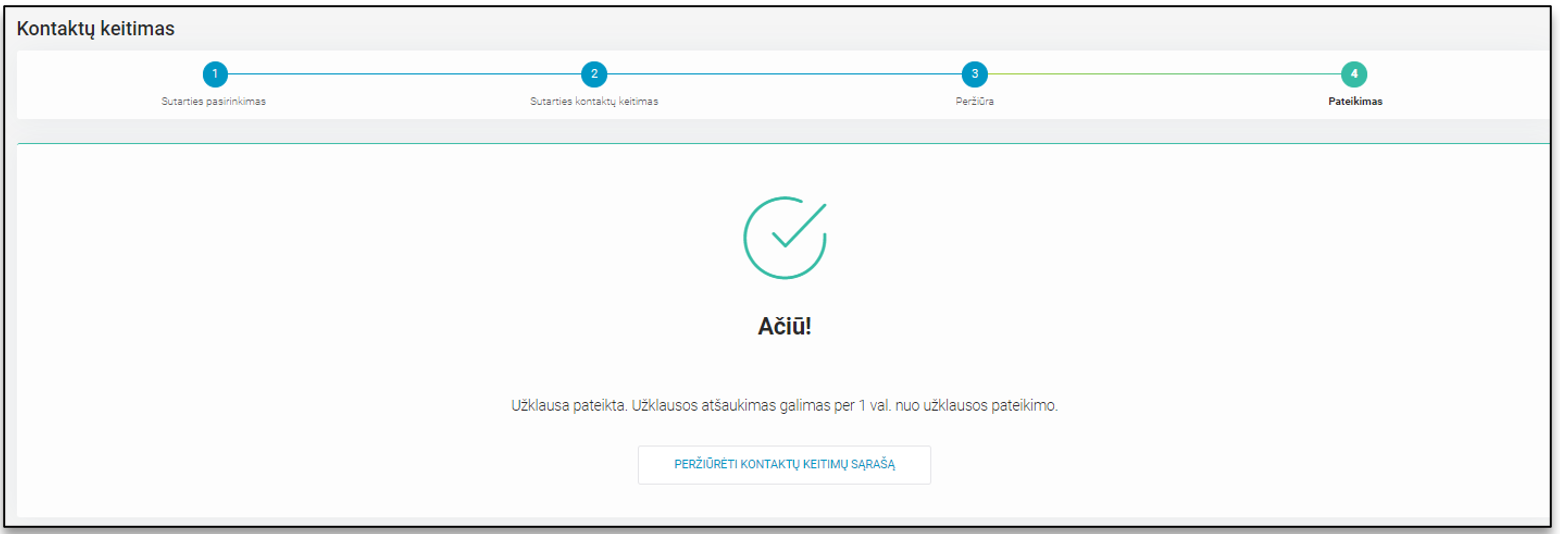
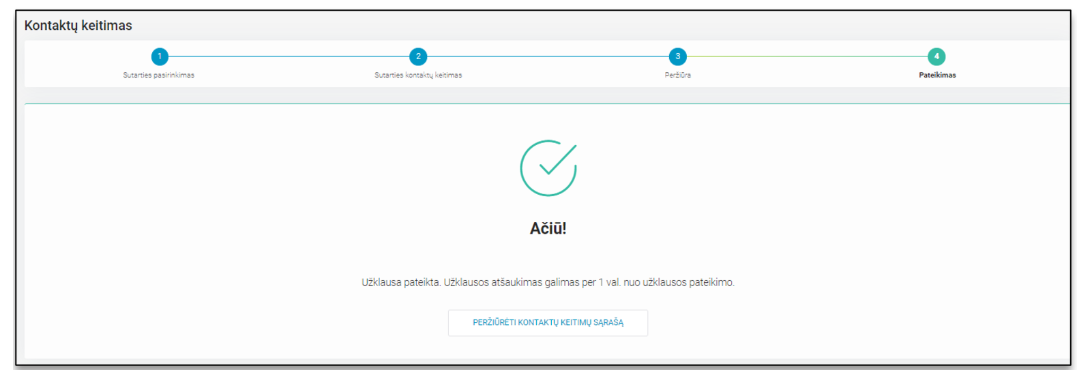
  1. Po mygtuko „PATEIKTI“ paspaudimo, sistemos naudotojas yra nukreipiamas į šeštąjį procesinį žingsnį, kuriame pateikiamas užklausos sukūrimo sėkmės pranešimas.

DH-650 The Contact Change

The Contact Change (hereinafter referred to as CC) functionality is one of the processes for administering existing contracts with a customer, designed for the supplier to inform the distribution operator about a change in the contact details of the facility owner.

This functionality is used when:

A change of contacts is required for a facility for which the supplier has a valid contract with the existing facility owner.

Changes In Change of contacts Process
Relevance dateChapterChange Description
2025-08-01-New documentation structure
   
   
Rules Of Change of contacts Process

Main process rules

No.RuleAdditional information
1.When the "Contact Change" process is initiated, the supplier can only find and initiate a customer contact change through the Data Hub for customers belonging to him at the time of the request.-
2.Changing contacts is done at the user code (i.e. ESO contract) level.
  • The user code is a counterpart to the ESO and the client contract.
  • The functionality is intended to change the contacts of the client contract.
  • If necessary, in the case of a SKMS contract, the contact can also be specified at the object level.
3.

In the case of a SBTS (domestic) contract, when changing contacts, you can specify:

  • Contract contacts for ongoing work and faults:
  • Correspondence address
  • Mobile phone number
  • Additional mobile phone number
  • E-mail address
  • Additional e-mail address
-
4.

In the case of SKMS (commercial), the following can be changed:

Contract contacts for ongoing work and faults:

  • Correspondence address
  • Mobile phone number
  • Additional mobile phone number
  • Email address
  • Additional email address

Contract contacts for invoices:

  • Mobile phone number
  • Phone number
  • Email address
  • Object contact for faults:
  • Mobile phone number

In the case of a SKMS contract, mobile phone number(s) and/or E-mail address(es) can only be specified if the contract and each data entry block do not already have any of these contacts.

This restriction is introduced in order to manage the risk of changing contacts for companies with many objects and different representatives.

5.In one request, changing contacts is possible for one contract or only for objects of one contract, if it is a SKMS contract.-
6.Importing queries as lists is not possible.-
7.If 1 hour has passed since the request was submitted and it has already been sent to ESO IT systems, the completed request can be canceled by submitting a request to cancel the supplier change request using the "Cancel Requests" functionality.Cancel request discription 
Scheme Of Change of contacts Process

Information is under preparation

We apologize for the inconvenience

DataHub team

Data Of Change of contacts Process
DuomuoAprašasJSON
Užklausos Nr.Chnage of contacts request numbernotificationId
Name, surname / Company name  "Vardas, pavardė / Įmonės pavadinimas"The name of the client's company or, if the client is a natural person, the name and surname of the personpersonName; personSurname
Personal / Company code  "Asmens / Įmonės kodas"Representation of the company code or personal code of the customer company to which the object belongs.personCode
Customer code  "Vartotojo kodas"Customer code of the contracted client.consumerCode
Object number  "Objekto Nr."Unique object number.objectNumber
Object address  "Objekto adresas"Object address.objectAddress
Agreement type  "Sutarties tipas"Indicates the type of agreement:
- SKMS - commercial
- SBTS - household
contractType
Correspondence address  "Korespondencijos adresas"Mailing addresscorrespondenceAddress
Mobile phone number - networks  "Mob. tel. Nr. - tinklai"Mobile phone number regarding networksmobPhoneNoNetwork
Mobile phone number (additional) - networks "Mob. tel. Nr. (papildomas) - tinklai"Mobile phone number (additional) regarding networksmobPhoneNo2Network
Phone number - networks  "Telefono Nr. - tinklai"phone number regarding networksphoneNoNetwork
Email address - networks  "El. pašto adresas - tinklai"Email address regarding networksemailNetwork
Email address (additional) - networks  "El. pašto adresas (papildomas) - tinklai"Email address (additional) regarding networksemail2Network
Mobile phone number - bills "Mob. tel. Nr. - sąskaitos"Mobile phone number regarding billsmobPhoneNoInvoice
Email address - bills  "El. pašto adresas - sąskaitos"Email address regarding billsemailInvoice
Object phone number  "Objekto mob. tel. Nr."Object mobile phone numbermobPhoneNoObject
New Correspondence address  "Naujas korespondencijos adresas"New mailing addressnewCorrespondenceAddress
New phone number - networks  "Naujas mob. tel. Nr. - tinklai"New phone number regarding networksnewMobPhoneNoNetwork
New mobile phone number (additional) - networks  "Naujas mob. tel. Nr. (papildomas) - tinklai"New mobile phone number (additional) regarding networksnewMobPhoneNo2Network
New phone number - networks  "Naujas telefono Nr. - tinklai"New phone number regarding networksnewPhoneNoNetwork
New email address - networks  "Naujas el. pašto adresas - tinklai"New email address regarding networksnewEmailNetwork
New email address (additional) - networks  "Naujas el. pašto adresas (papildomas) - tinklai"New email address (additional) regarding networksnewEmail2Network
New mobile phone number - bills  "Naujas mob. tel. Nr. - sąskaitos"New mobile phone number regarding billsnewMobPhoneNoInvoice
New email address - bills  "Naujas el. pašto adresas - sąskaitos"New email address regarding billsnewEmailInvoice
New object phone number  "Naujas objekto mob. tel. Nr."New object phone numbernewMobPhoneNoObject
WEB Instruction For Change of contacts Process
  • Rules applicable for process you can find in chapter „DH-650-1 Rules For Change of contacts Process“.

    !Please note that Datahub WEB page interface do not have English menu option. All information is provided in Lithuanian.

REQUEST  "CONTACT CHANGE" (KONTAKTŲ KEITIMAS) SUBMISSION STEPS:

  1. Submission of a new contact change request is initiated by the system user by selecting the menu item "Contract Administration" (Sutarčių administravimas), the menu sub-item "Contact Change" and clicking the "CONTACT CHANGE" (KONTAKTŲ KEITIMAS) button.


  2. After clicking the button, the system user enters the first step of changing contacts "Contract Selection" (Sutarties pasirinkimas), where he has the opportunity to search for objects by: User code, Person / Company code, Meter No., Object No. In order to find a contract for which contacts will be changed, the system user must enter at least one of the four data and click the "SEARCH" (IEŠKOTI) button.

  1. According to the specified search criteria, a specific contract(s) is found in the data exchange platform
    - if the search is performed by Person/Company Code, all contracts belonging to that person or company are found;
    - if the search is performed by user code – a specific contract is found;
    - if the search is performed by object number – a specific contract is found that contains the object number specified in the search;
    - if the search is performed by meter number – a specific contract is found that contains an object with the meter specified in the search.
  2. Please note that a contact change request can only be submitted at the level of one contract at a time.
  3. The list of contracts contains the data of the client participating in the process and their contract with the supplier, described in the "Contact change process data" (Kontaktų keitimas proceso duomenys) section above.

  1. After the system user selects a contract for which contact changes are required and clicks the "NEXT" (TOLIAU) button, he is directed to the second process step "Change of contract contacts" (Sutarties kontaktų keitimas). In this step, the system user is presented with a data editing form:
  2. If the SBTS type contract is selected in step 1 "Contract selection", the user can (but is not required to) fill in the following fields:
     
    • New correspondence address
       
      • If the required address is not found in the classifier, it is possible to mark the attribute "New correspondence address not found", in which case the correspondence address line is filled in with the address of the first object of the contract.
      • If an existing correspondence address is deleted and a new one is not provided, the error "New correspondence address field is required" is received.
    • Contact details for information about ongoing network work (accounting maintenance, planned power outages and failures)
    • New mobile phone number
    • New mobile phone number is added.
    • New email address
    • New email address is being added
       
      • If existing contact details are deleted and new ones are not provided, the error "At least one field is required: New mobile phone number, New phone number, New email address" is received.

  1. If the SKMS type contract is selected in step 1 "Contract selection", the user can (but is not required) fill in the following fields:
      New correspondence address
        If the required address is not found in the classifier, there is an option to mark the attribute "New correspondence address not found", in which case the correspondence address line is filled in with the address of the first object of the contract.
      Contact details for informing about ongoing network work (accounting maintenance, planned electrical disconnections and failures)
        New mobile phone number
      Can be specified only if the fields "New mobile phone number" and / or "New e-mail address" are not filled in with existing contacts.
        New mobile phone number is additional
        New e-mail address
      Can be specified only if the fields "New mobile phone number" and / or "New e-mail address" are not filled in with existing contacts.
        New e-mail address is added
      Contact details for informing about created accounts and provided services:
        New mobile phone number
      Can be specified only if the fields "New mobile phone number" and / or "New e-mail address" are not filled with existing contacts.
        New phone number
        New e-mail address
          Can be specified only if the fields "New mobile phone number" and / or "New e-mail address" are not filled with existing contacts.

  1. In the case of the SKMS contract, there is an opportunity to edit/provide contact information for a specific object.
    1. After the system user fills out the data editing form located in the 2nd procedural step and clicks the "NEXT" (TOLIAU) button, he is directed to the 3rd procedural step "Changing contacts of the object(s)"  (Objekto (ų) kontaktų keitimas).
    2. In this step, the user is provided with a list of all objects under the contract, where for each individual there is an opportunity to specify an additional mobile phone number, which will provide information about the progress of the elimination of electrical malfunctions and planned power grid disconnections.
    3. If an additional mobile phone number is not specified, information will be sent to the contacts specified in the contract.

  1. When the system user selects an object from the list for which they want to edit/provide a contact and clicks the edit icon, the system activates the field for entering a new mobile phone number.
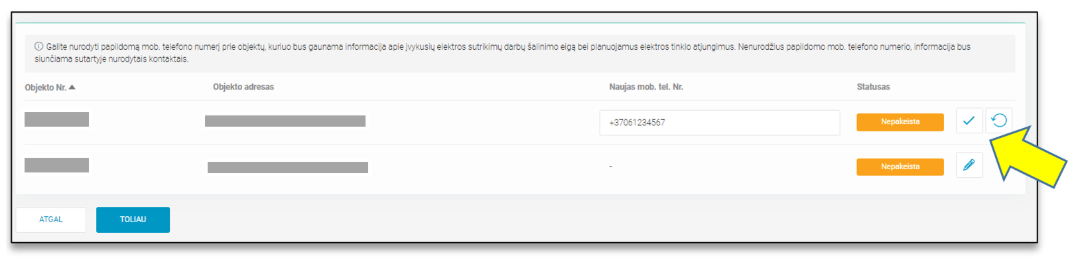
  1. After entering the required contact and clicking the save icon, the new object contact is saved and the status is changed to "Changed" (Pakeista). The new contact is not saved until the save icon is clicked. If the system user wants to restore the contact that existed before editing, they can do so by clicking the restore icon . .
  2. After filling in all the required data and clicking the "NEXT" button, the system user is directed to the third (in the case of a SBTS contract) or fourth (in the case of a SKMS contract) procedural step "Review", where he can check the submitted data.
  3. In the review step, the system user can return to the previous steps by clicking the "BACK" (ATGAL) button, or
  4. After making sure that the submitted data is correct and checking the "I confirm that the submitted data is correct" („Patvirtinu, kad pateikti duomenys yra teisingi“) checkbox, submit a supplier change request by clicking the "SUBMIT" (PATEIKTI) button.

  1. After clicking the "SUBMIT" (PATEIKTI) button, the system user is directed to the sixth process step, where a message is displayed indicating the success of the request creation.